
Trusted by:
University of Southern California
Warner Bros.
Volvo
Amazon
Stanford University
Updated: September 04, 2026
11 min read
See how Zapier, Make, Pipedream, and custom API options compare for connecting Dynamics 365 to Certifier. Choose based on support for your Dynamics app and the workflow trigger you need.
Research with AI:
The Dynamics 365 app you use determines your connection options.
Customer Relationship Management (CRM), Business Central (BC), and Finance and Operations (F&O) don’t all support the same third-party tools or workflow triggers, so a connection supporting one setup may not work for another.
The four main options available are Zapier, Make, Pipedream, and a custom Application Programming Interface (API).
Zapier and Make let you build a Certifier workflow through a visual interface.
Pipedream gives you more developer control while managing the workflow infrastructure for you.
A custom API offers the most flexibility, but your team must build, host, and maintain it directly.
This article compares which connection methods work with different Dynamics apps, their available triggers for certificate issuance, and how much setup and maintenance they require.

While Certifier connects natively with Microsoft apps like Excel and Forms, it doesn’t have a direct integration for the Microsoft Dynamics suite.
To use your Dynamics data to automatically issue certificates or badges, you’ll need to set up your workflow using a third-party automation tool or a custom API.
Specific Dynamics apps use their own unique record types and system events. This directly impacts how your data maps to Certifier and determines which triggers you can use to kick off automated credential delivery.
App | Zapier | Make | Pipedream | Api |
|---|---|---|---|---|
CRM | ✅ Supported | ✅ Supported | ✅ Supported | ✅ Supported |
🟢 Triggers: New case/incident, New Lead, New Opportunity | 🟢 Triggers: Watch Records | 🟢 Triggers: New opportunity activity, Opportunity marked won, Opportunity stage updated | 🟢 Triggers on record changes | |
BC | ✅ Supported | ✅ Supported | ✅ Supported | ✅ Supported |
🟡 No triggers | 🟢 Triggers: Watch Records | 🟢 Triggers: Webhooks | 🟢 Triggers on business events | |
F&O | ❌ No prebuilt connection | ✅ Supported | ❌ No prebuilt connection | ✅ Supported |
– | 🟡 No triggers | – | 🟢 Triggers on process completion |
When a connector is compatible with a Microsoft Dynamics app, it can access that app’s data and pass selected fields to Certifier directly.
For example, a CRM workflow could take the recipient’s name and email from a newly closed sales opportunity, send those details to Certifier, and issue the certificate automatically.
However, a connector can sometimes be compatible without including the trigger you need.
It may be able to retrieve records after a workflow starts, but it won’t notice when a specific action happens in Dynamics. In that case, your team needs to configure an additional step to start the workflow.
This is usually a one-time setup completed by an administrator or developer. Once configured, certificates can be issued automatically.
Common setups include:
Webhook + HTTP request: Dynamics sends the automation a notification as soon as the selected action happens. The automation then uses an HTTP request to retrieve the full record and pass the required fields to Certifier.
Schedule + HTTP request: The automation runs at set intervals, such as every 15 minutes. It sends an HTTP request to the Dynamics API to find records created or updated since the previous check.
Suppose Certifier should issue a certificate when a sales opportunity reaches a qualifying stage.
A connector with the right trigger can detect the change and start the workflow immediately. Without that trigger, the workflow could check for recently updated opportunities every few minutes. Alternatively, Dynamics could send a webhook when the stage changes.
In both cases, the workflow retrieves the opportunity details and sends new records to Certifier.
Zapier, Make, and Pipedream run the automation for you. With a custom API, your team handles hosting directly. Here’s how the options compare.
Zapier offers the most guided, no-code setup when it includes the predefined trigger you need.
An administrator can build the workflow in a visual editor by selecting a CRM trigger and mapping the recipient’s name and email to Certifier using simple data fields.
This, however, doesn’t apply to BC workflows. Zapier lets you find a shipment or make an API request, but it has no trigger of its own for Jobs modules or specific tasks. Your team must add a schedule or webhook manually.

As for recurring cost, this connection requires a paid, cloud-hosted Dynamics plan. Microsoft Dynamics 365 apps are classified as premium Zapier connections, so you’ll also need a paid Zapier plan.
Each plan tier provides a monthly tasks limit for your workflow. Zapier counts each successful action toward this monthly allowance. The trigger and filter do not use tasks, but issuing a credential in Certifier does, as will any additional action steps.
Maintenance is usually light for a standard CRM Zap. Your team needs to review failed runs, reconnect accounts when access expires, and update filters or field mappings if the Dynamics record changes.
You should also monitor monthly task usage. Business Central workflows need more upkeep due to the additional schedule, webhook, or API step, which must also be monitored.
👉 Learn about Certifier’s Zapier integration.
Make uses a visual scenario builder similar to Zapier’s workflows. An administrator can create a standard scenario without code.
It just takes selecting your Dynamics module, filtering qualifying records, and mapping recipient data before adding Certifier’s “Issue a Credential” step.
CRM and BC include a “Watch Records” trigger that let Certifier issue credentials for newly created records.
Workflows based on subsequent changes — like an opportunity reaching a specific stage — need a scheduled search or webhook.

F&O has no prebuilt trigger, so the scenario must start on a Make schedule or receive an event from another service. Scheduled searches must also store the last processed record or date to avoid issuing the same credential more than once.
All three Dynamics apps require a cloud-hosted environment to connect.
Also note that Make charges you based on credits (the actions your workflows take). Every step inside a workflow consumes one credit, so workflows with several searches and actions use more credits per credential.
Ongoing maintenance includes reviewing failed runs, reconnecting accounts, and updating filters or field mappings when needed.
👉 Learn about Certifier’s Make integration.
Pipedream is a more developer-focused option for teams needing flexible workflows without having to deploy and maintain their own server or cloud application.
For Dynamics 365 Sales, the platform includes several prebuilt triggers like “New Opportunity Created” and “Opportunity Stage Updated.” They check Dynamics on a schedule, then pass the matching record to Certifier’s Issue Credential action. Unsupported records or events require an HTTP request.

For BC, developers can use actions such as “Get Sales Order” or “Issue Credential with Certifier.”
But there are no prebuilt triggers to let Pipedream see updates inside the app, so you’ll still need an external workflow starting step. The platform also doesn’t include a dedicated connection for Dynamics F&O.
Regarding running costs, Pipedream charges for processing time and memory, not the number of workflow actions. Credit consumption scales with memory usage in 256MB blocks. At the default memory setting, one credit covers up to 30 seconds of processing.
Ongoing maintenance includes reviewing errors, monitoring credit use, and updating mappings or code when your Dynamics setup changes.
👉 Learn about Certifier’s Pipedream integration.
Certifier’s API requires a team-hosted setup, so you won’t need a third-party tool like Zapier or Pipedream, but you’d be building the automation directly. This means full control, although it also requires more technical work upfront.
This option connects two APIs to let Microsoft Dynamics and Certifier exchange data. The Microsoft Dynamics API supplies the information you need for certificate issuance. The custom code sends these details to the Certifier API, which creates and sends the credential.
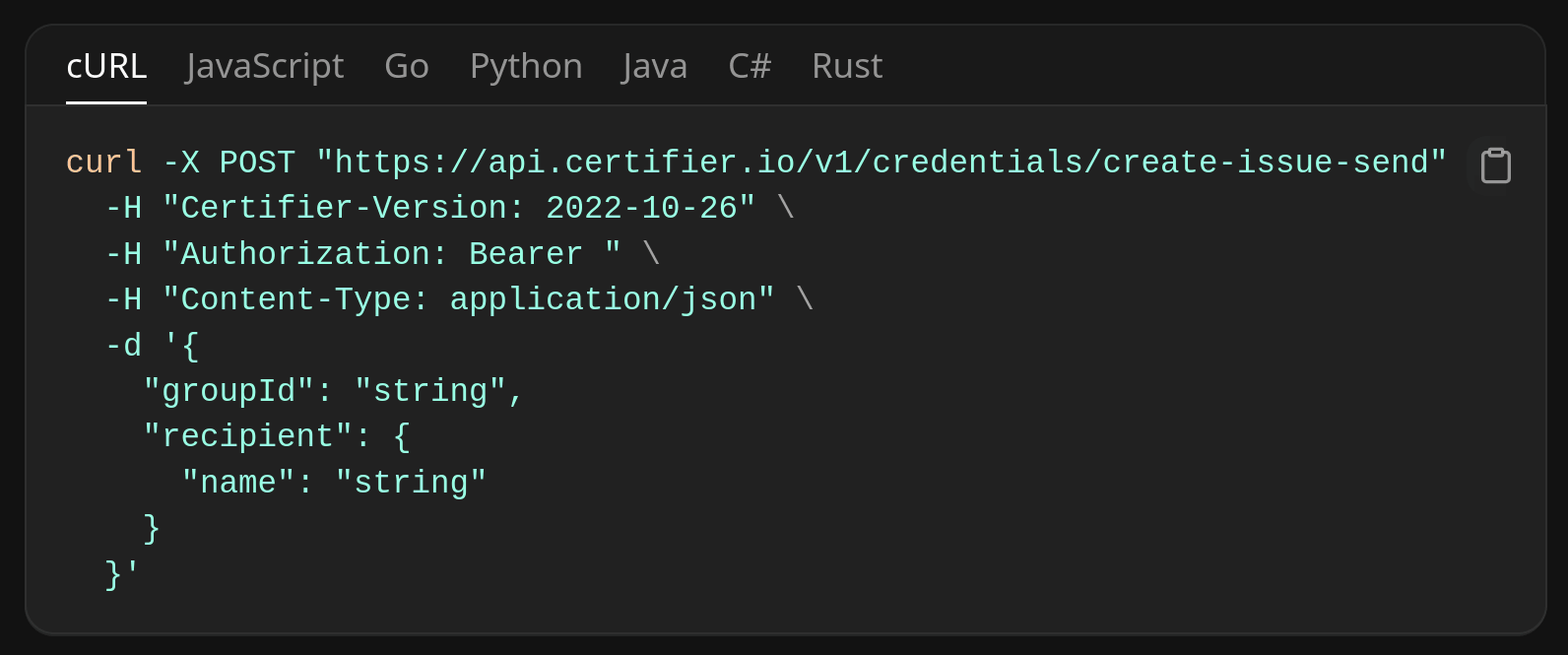
For example, you might want to issue a credential when a sales opportunity is marked as “Won.”
The automation detects the update and sends the contact’s name, email, completion date, and credential type to Certifier. Certifier then generates the certificate and emails it directly to the recipient.
Data access differs across Dynamics apps:
CRM/Sales: Uses the Dataverse Web API, which covers standard records such as opportunities and contacts, along with custom tables created by your organization.
Business Central: Provides APIs for common records. If the data sits in a custom table, a developer must send it to Certifier through an additional Application Language (AL) API.
F&O: Makes selected data available through the OData protocol. Internal data and business operations requires a custom service, like a X++ web service.
Your developers must also prevent errors and duplicate credentials. The application should record each Dynamics item it processes. If a request fails, it should save the error and retry.
Certifier accepts an average of three incoming API requests per second, so large batches need a queue that sends them gradually.
Ongoing costs include cloud hosting, monitoring, and developer time. Your team must also secure both API connections, renew access credentials, and update the code.
Use this checklist to compare the options against your setup and certificate needs:

App and trigger coverage: Choose one option that supports every Dynamics app and trigger you need. For example, Zapier works for a simple CRM-only workflow where you need to issue certificates for new leads. For a workflow using both CRM and F&O, Make covers both, although F&O still needs a schedule or webhook.
Rules and exceptions: Use simple connectors like Zapier or Make for basic certification criteria, like when a new qualifying record is created. Consider more complex API automations for specific use cases and filters, like excluding canceled jobs.
Team resources and setup time: Choose Zapier or Make if your team needs a quick, no-code setup. If you have the necessary developer support, choose Pipedream if your workflow needs more flexibility, or a custom API if you prefer full control over hosting and deployment.
Volume and reliability: Estimate how many credentials you’ll issue and how quickly they need to go out. Zapier, Make, or Pipedream work well when monthly tasks or credit limits comfortably cover issuance. A custom API can be cheaper at high volume, but only if your team already has the capacity to maintain it.
Total cost and tool count: Factor in subscription fees, hosting, and engineering hours. Use Zapier or Make if you already pay for them and they fit your workflow, or build a custom API if avoiding another recurring bill is worth the extra dev workload.
These checks should make it easier to choose the simplest option that supports your Dynamics app, certificate needs, and volume without adding unnecessary cost or overhead.
Yes, you can create a separate Dynamics connection or workflow for each environment, then send approved records to the same Certifier workspace and credential template.
Each Dataverse environment has its own URL, while Zapier and Make support multiple connections.
If someone’s eligibility is reversed, you’ll have to manually update the live certificate so its status matches the new Dynamics record. Alternatively, you can delete the credential entirely.
If using an API, the workflow can detect eligibility changes and update the credential’s expiration date. Expired credentials remain visible as expired; if deleted, they become inaccessible and can’t be restored.
Yes. In the Certifier action, set Issue Credential to “False” in Zapier or Pipedream, or “No” in Make. This saves the credential as a draft. A workspace admin can review it under Certifier’s Credentials list, then select it and click “Issue” when approved.
Yes, but you must do it manually instead of relying on a live trigger. First, use Dynamics 365 Advanced Find to query your past completion dates. Next, export the data to a CSV file and bulk-issue the credentials directly in Certifier.
You don't need additional workflow steps to prevent duplicate credentials. Certifier has built-in duplicate protection directly inside your certificate template settings.
By turning off the "Allow Duplicate Recipient Emails" toggle, Certifier will automatically look at incoming email addresses and silently skip any record that has already received that specific certificate.

- Content Strategy
- SEO & AEO/GEO strategy
- Conversion Rate Optimization
- Organic Growth
- Buyer Psychology
Head of Content
Vlad Melnic leads content at Certifier, bringing 10+ years of experience in SEO content marketing and conversion-focused content. His focus is turning complex product value into clear benefits.